

Sports Procurement Automation: Connecting Supplier Management, Sourcing and Finance
Sports organizations manage a wide range of purchasing activities, from sourcing equipment and operational supplies to managing supplier relationships, contracts, deliveries, and payments. When these activities are handled through disconnected processes, procurement teams may struggle to maintain visibility, ensure consistent evaluation, and track obligations across the purchasing lifecycle.
A unified procure-to-pay solution built with Aura connects procurement activities from the initial purchase request through supplier sourcing, contract management, goods receipt, and invoice matching, while maintaining a clear connection with the organization’s financial system.
The Challenge
Procurement involves several connected stages and stakeholders, including procurement teams, suppliers, evaluation committees, contract managers, and finance departments.
Managing these activities separately can create challenges such as:
- Fragmented supplier registration and qualification processes.
- Limited transparency across sourcing events, proposals, and award decisions.
- Difficulty tracking contract milestones, obligations, renewals, and supplier performance.
- Repeated data entry between procurement and financial processes.
- Delays in matching purchase orders, goods receipts, and supplier invoices.
- Limited visibility into procurement activities and integration status.
The objective is to establish one controlled purchasing journey, with clear ownership and traceability from the initial request to the financial transaction.
The Solution: An Integrated Procure-to-Pay Platform Built with Aura
The solution brings supplier-facing activities and internal procurement processes into a connected digital environment. It covers supplier onboarding, vendor management, electronic sourcing, contract management, and invoice matching.
The procurement application suite is designed to manage procurement workflows, while Microsoft Dynamics 365 remains the financial system of record.
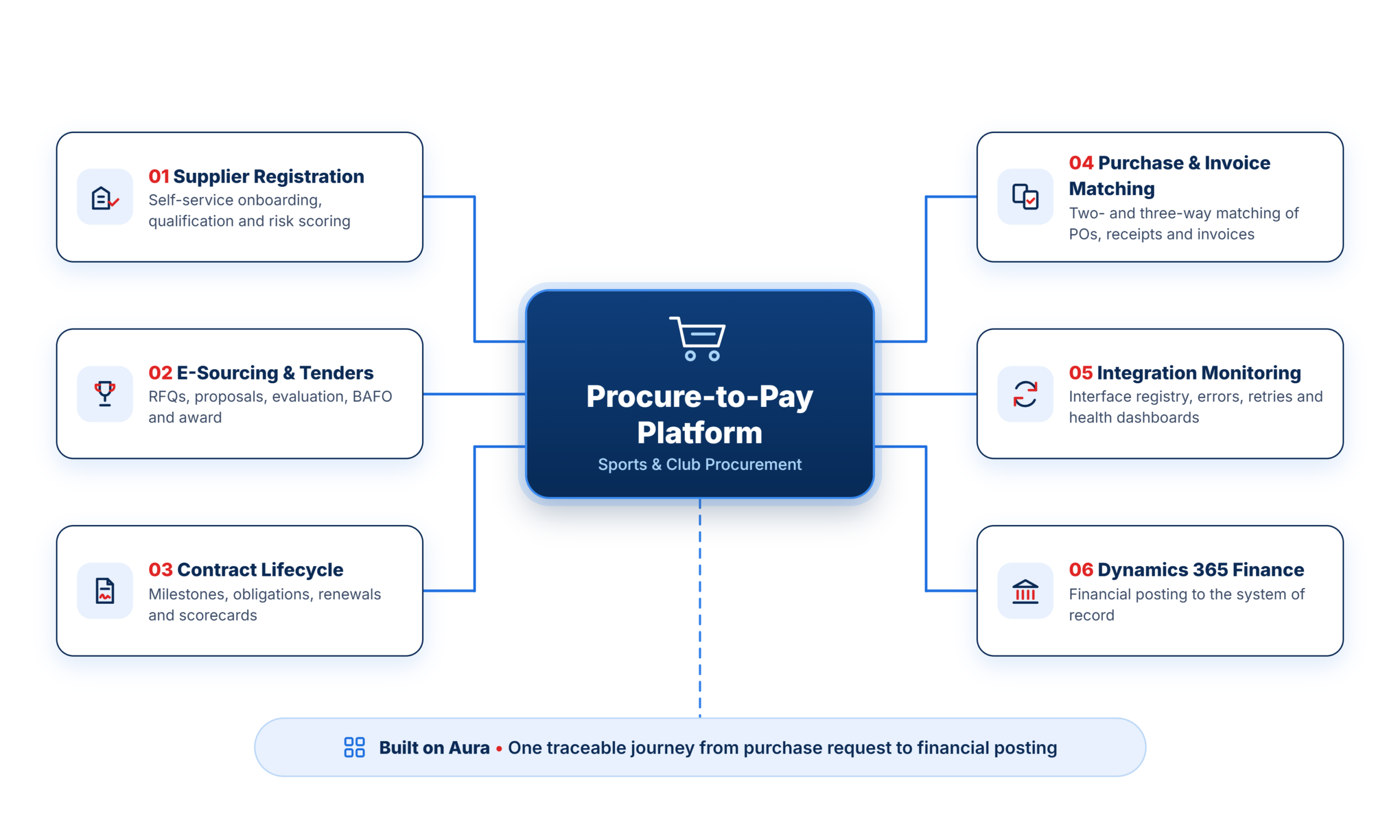
Key Capabilities
1. Supplier Registration and Management
- Enables suppliers to register through a structured self-service journey.
- Captures company details, contacts, categories, banking information, documents, and declarations.
- Supports registration review and duplicate checks against the supplier master.
- Applies category-based qualification scoring, compliance questionnaires, and risk outcomes.
- Manages supplier master change requests through controlled approvals.
2. Electronic Sourcing and Tender Management
- Creates RFQ and tender events from approved purchase requests.
- Manages supplier invitations, participation responses, and clarification questions.
- Supports versioned proposals with separate technical and commercial submissions.
- Enables evaluation, ranking, negotiation, and Best and Final Offer (BAFO) rounds.
- Records award decisions and associated savings.
3. Contract Lifecycle Management
- Creates contracts based on approved sourcing awards.
- Maintains contract lines, milestones, and payment schedules.
- Tracks amendments, obligations, risks, and renewal dates.
- Supports supplier performance scorecards covering delivery, quality, compliance, and responsiveness.
- Manages contract closeout and retention release.
4. Purchase and Invoice Matching
- Connects purchase orders with goods receipts and supplier invoices.
- Supports two-way and three-way matching.
- Provides a structured process for monitoring matching activities and exceptions.
- Supports the hand-off of financial transactions to Microsoft Dynamics 365.
5. Integration Monitoring and Management Visibility
- Maintains an integration registry with interface sources, targets, triggers, and status.
- Records execution errors, retries, and resolution activities.
- Provides dashboards for supplier onboarding, contract portfolios, and integration health.
- Helps procurement and management teams monitor activity across the purchasing lifecycle.
How the Workflow Works
- Purchase request: A purchasing need is submitted and proceeds through the defined procurement process.
- Sourcing event: An RFQ or tender is created, and qualified suppliers are invited to participate.
- Proposal submission: Suppliers submit their technical and commercial proposals through the designated process.
- Evaluation and award: Proposals are evaluated and ranked, followed by negotiation where required and the final award decision.
- Contract creation: The approved award is converted into a contract with defined lines, milestones, and payment schedules.
- Purchase order and receipt: The purchasing process continues through order issuance and goods receipt.
- Invoice matching: The supplier invoice is matched against the purchase order and receipt records.
- Financial posting: The relevant financial transaction is handed over to Microsoft Dynamics 365.
The Role of Aura
Aura provides the application-building and workflow foundation for connecting procurement activities across departments and external suppliers. Its platform capabilities support configurable applications, business rules, approval processes, supplier-facing forms, integration workflows, and operational dashboards.
By connecting procurement workflows with existing enterprise systems, Aura helps organizations reduce process fragmentation, improve visibility, and maintain control over the purchasing lifecycle.
The result is a more connected procurement environment in which supplier interactions, sourcing decisions, contractual obligations, and financial hand-offs follow a structured and traceable process.
Explore Aura: https://ntgapps.com/aura/